
There's nothing like it on the market.

Your credentials hub with true end‑to‑end encryption

One hub for all your credentials — with a special module for people who work with SAP.
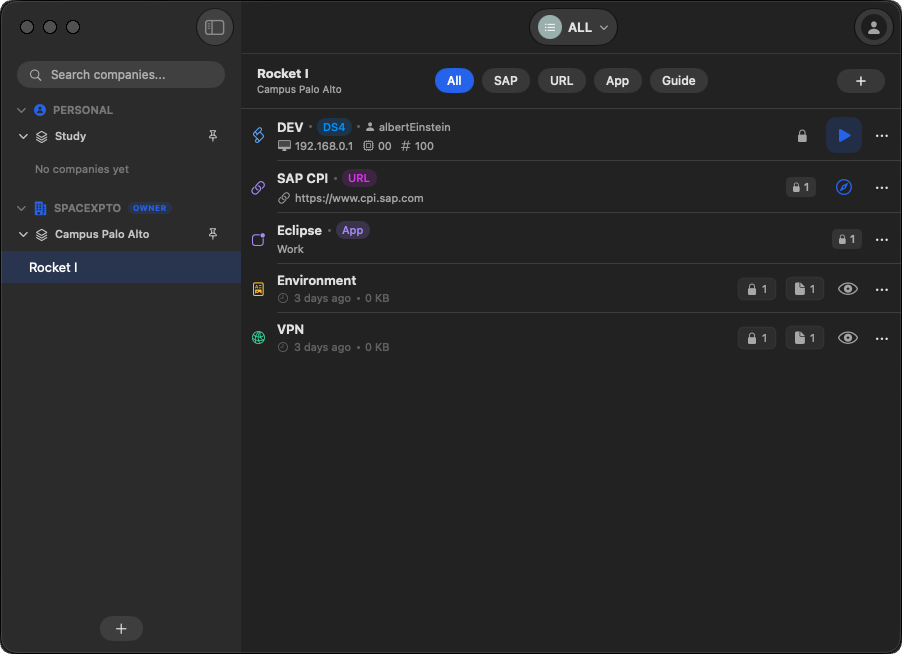
Only the account owner can access saved credentials
Solo + Organizations for team access control
Windows tray and macOS menubar, with shortcuts and auto-start
Bonus: launch SAP GUI directly from the app
ConnexGUI
Features

A problem nobody fixed (until now)

Credential storage is messy: spreadsheets, chats, reused passwords, uncontrolled access. ConnexGUI solves it with a fast, secure experience.

Everything in one place
SAP, URLs, VPNs and any credential type — organized with filters and search.
Made for teams
Organizations centralize credentials and control who can access what — perfect for consultancies.
Zero friction
Shortcuts, tray/menubar access and optional start with your computer.
Bonus: launch SAP GUI
For those who still use it, you can open SAP GUI directly from the app.
Features

Everything your daily credential workflow needs

From login to SAP in one shortcut, through organizations with fine-grained permissions and reminders that stop passwords going stale for years.

Auto-type
Type or copy the username, the password, or a secret’s name and value, even as NAME=VALUE. Context suggestions, “Working now” and recents.
Secrets and variables folders
Keep keys, variables and files (like a .env or a plist) per company or project. Import and copy as .env, all encrypted.
SAP connection environments
Tag each connection as DEV, QAS, SANDBOX, BUBBLE or PRD, with a color label so you never mix up production and test.
Companies or projects
Organize connections by company or by project, the way your work is split.
Opens SAP GUI
Launch the SAP connection straight from the app, without opening SAP Logon and hunting for the right entry.
Browser autofill
A Safari extension that fills logins for saved URLs, with an audit record whenever you use it.
App connections
Store credentials for apps and services too, next to SAP and URLs, in the same vault.
Organizations with permissions
Per-person permission tree with inheritance and presets. Everyone sees only what was shared with them.
Organization audit
Know who accessed or changed what, with limited retention and without exposing credential contents.
Old-password reminder
Set a maximum age and get warnings on rows plus a weekly summary of passwords that need changing.
Markdown guides
Document each access step by step in Markdown, encrypted alongside the credential.
Menu bar and updates you confirm
Search and copy from the menu bar; the app tells you when a new version is out and updates in one click, with signature verification.
Security

Real end‑to‑end security

E2E encryption from login to the most sensitive data. Saved credentials are accessible only to the account owner.

E2E from start to finish
Protection starts at login and extends to every sensitive field stored.
Access by design
No “admin mode” that reads everything: you only see what is explicitly shared with you.
Safe sharing
Inside Organizations, permissions define exactly who can see each credential.
Data cipher
AES-256-GCM
Password derivation
PBKDF2 · 600k iterations
Organization key
RSA-2048 + rotation
Login ≠ vault password
The server authenticates you with a one-way derived value. Neither your password nor the vault key travels.
Names encrypted too
Not just passwords: names, companies, spaces and the hierarchy are unreadable on the server.
Recovery kit
28-character code to store offline. Without the password and the kit, not even we can open your vault.
Organizations

Solo or Organizations

Within your account, you can work Solo and also join one or multiple Organizations (companies).

Solo
Perfect for personal use: your credentials stay under your control, with fast access and E2E encryption.
E2EShortcutsSearch
Organizations
Built for teams and consultancies: centralized credentials, per-person permissions and simple governance.
PermissionsConsultanciesGovernance
Platform

Windows & Mac, built into your day

Compatible with Windows and macOS, with tray on Windows and menubar on macOS.

Tray / Menu bar
Open, search and copy credentials in seconds — without unnecessary windows.
Configurable shortcuts
Automate what you do every day with fast key combinations.
Optional auto-start
Choose whether the app launches with your computer.
Pricing

Pricing

Pick a plan for your workflow. Organizations keep teams centralized and secure.

Save 20%
Free
Free
  • 1 account
  • 1 company
  • 3 connections
  • Individual plan
Pro
Popular
US$ 4.99/month (total)
  • 3 accounts
  • 50 companies
  • 100 connections
  • Individual plan
Enterprise
From US$ 2.49/member/month
  • Unlimited accounts, companies, connections and members
  • Can create an organization
  • Per-member billing with graduated rates: the larger the organization, the lower the rate
  • From US$ 5.99 down to US$ 2.49 per member/month, by tier
Monthly or yearly billing, processed by Paddle. Prices in USD. See the full breakdown on the Pricing page.
Download

Download

Download and start using it in minutes.

Windows
Tray + configurable shortcuts
Download for Windows
macOS
Menu bar + shortcuts · macOS 15+ (Apple Silicon and Intel)
Download for macOS
FAQ

FAQ

Who can access saved credentials?
Only the account owner. In Organizations, you only see what’s shared with you through permissions.
Is it only for SAP?
No. ConnexGUI stores any credential: URLs, VPNs, services, and more. SAP is a special module for SAP developers, consultants and consultancies.
How does this help consultancies?
Organizations centralize credentials and control access per consultant/client, keeping governance without spreadsheets or passwords in chat.
Can you see my passwords?
No. Everything is encrypted on your device before it leaves it, and the server does not have the key. Details on the Security page.
I forgot my password. Now what?
Use the recovery kit generated by the app. Without the password and the kit, no one, including us, can recover the data. That is the price of us not having access to it.
What happens when someone leaves the organization?
The organization key is rotated and content is re-encrypted with the new version, so the removed person no longer has access to the data.
Does the app send usage data?
Only if you turn it on, and anonymously. We never send names, hosts, passwords, URLs or guide contents.
Does the app update itself?
It tells you when a new version is out and installs it with your confirmation, then restarts itself. Updates are verified by digital signature before installing.
Does it work on Windows and Mac?
Yes, with a tray on Windows and a menu bar on macOS (macOS 15 or newer; Apple Silicon and Intel).